
One platform for every screen you manage.
Upload media, build playlists, schedule content by day or time, push emergency alerts, and monitor every display — all from a cloud dashboard built for real businesses.
No credit card required · 14-day free trial · From $9/mo after
Built for businesses that need professional digital signage software
Whether you need a digital signage CMS for one screen or a cloud signage platform for multiple locations, Everuna gives you the tools to manage displays, automate content, and verify performance without enterprise complexity.
Cloud digital signage dashboard
Control screens, content, schedules, playlists, and reporting from one centralized dashboard.
Digital signage CMS features
Upload media, organize playlists, automate publishing, and manage content at scale without complex setup.
Multi-location screen management
Manage one screen or many locations with the same cloud signage platform and reporting workflow.
How our digital signage software works
Connect a screen, upload content, schedule playlists, and manage everything from the cloud.
Sign up — free, no credit card
Create your account in under 2 minutes. Every plan starts with a 14-day free trial — no credit card, no commitment.
Upload your content
Add images, videos, menus, and promotions. Organize media and build playlists with a visual drag-and-drop editor.
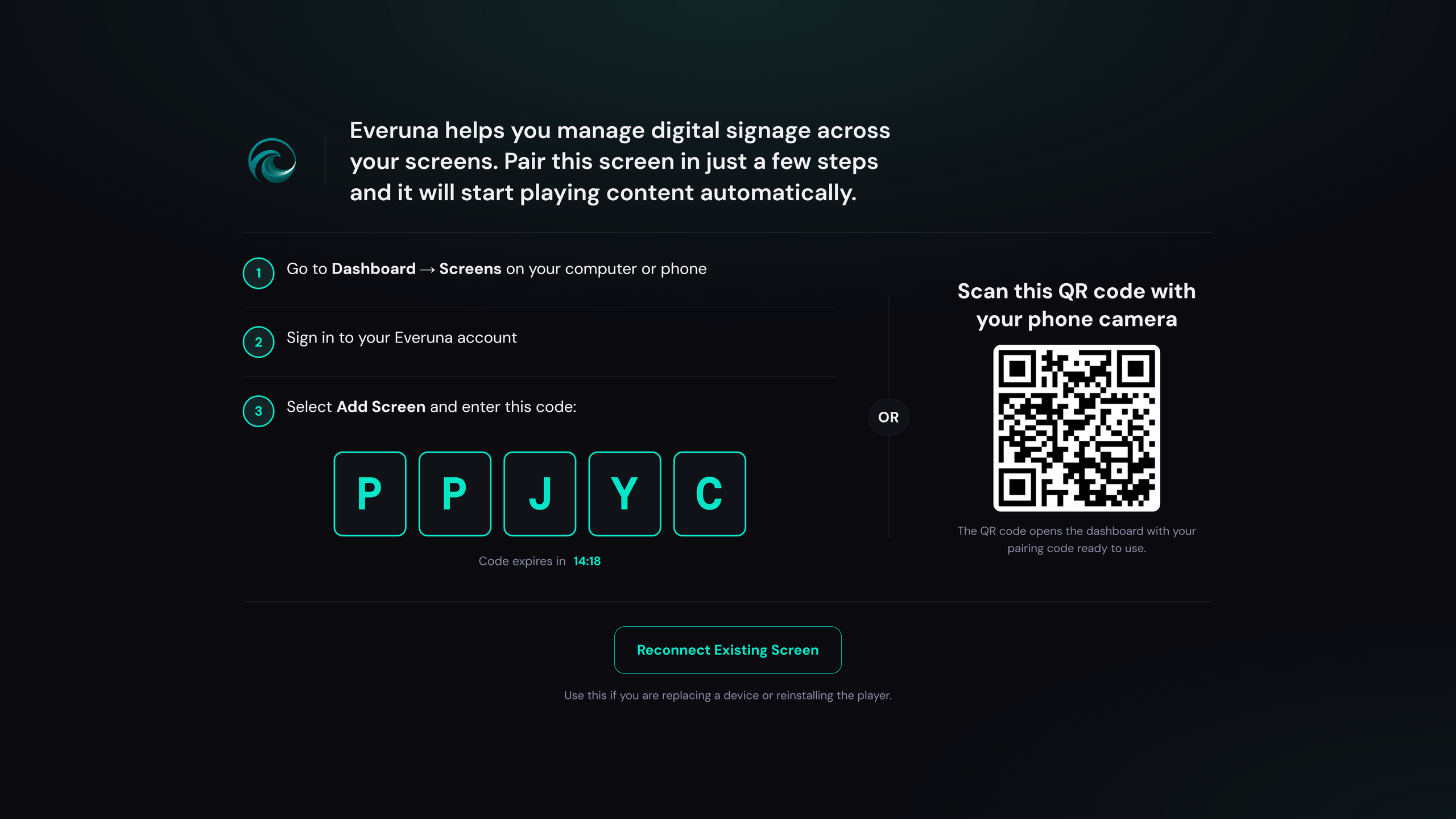
Pair your screen with a code
Open app.everuna.com/pair in the TV's browser and it shows a 5-character code. Enter that in your dashboard and the two are linked. Works with smart TVs, Fire TV Stick, Android TV boxes, tablets, and any computer with a browser.
Manage everything from your dashboard
Schedule by time or day, monitor screen health, and track proof-of-play — from any browser, anywhere in the world.
What you get
Everything below is in the product today. Some of it is on the Business and Pro plans — the pricing page says which.
Drag-and-drop playlists
Build digital signage playlists visually, reorder content with drag-and-drop, and set custom durations for every asset.
Smart scheduling
Schedule content by hour, day, date range, and recurring weekly patterns. Apply priority rules when schedules overlap.
Content triggers
Automatically change content based on weather, time of day, or day of week for smarter digital display automation.
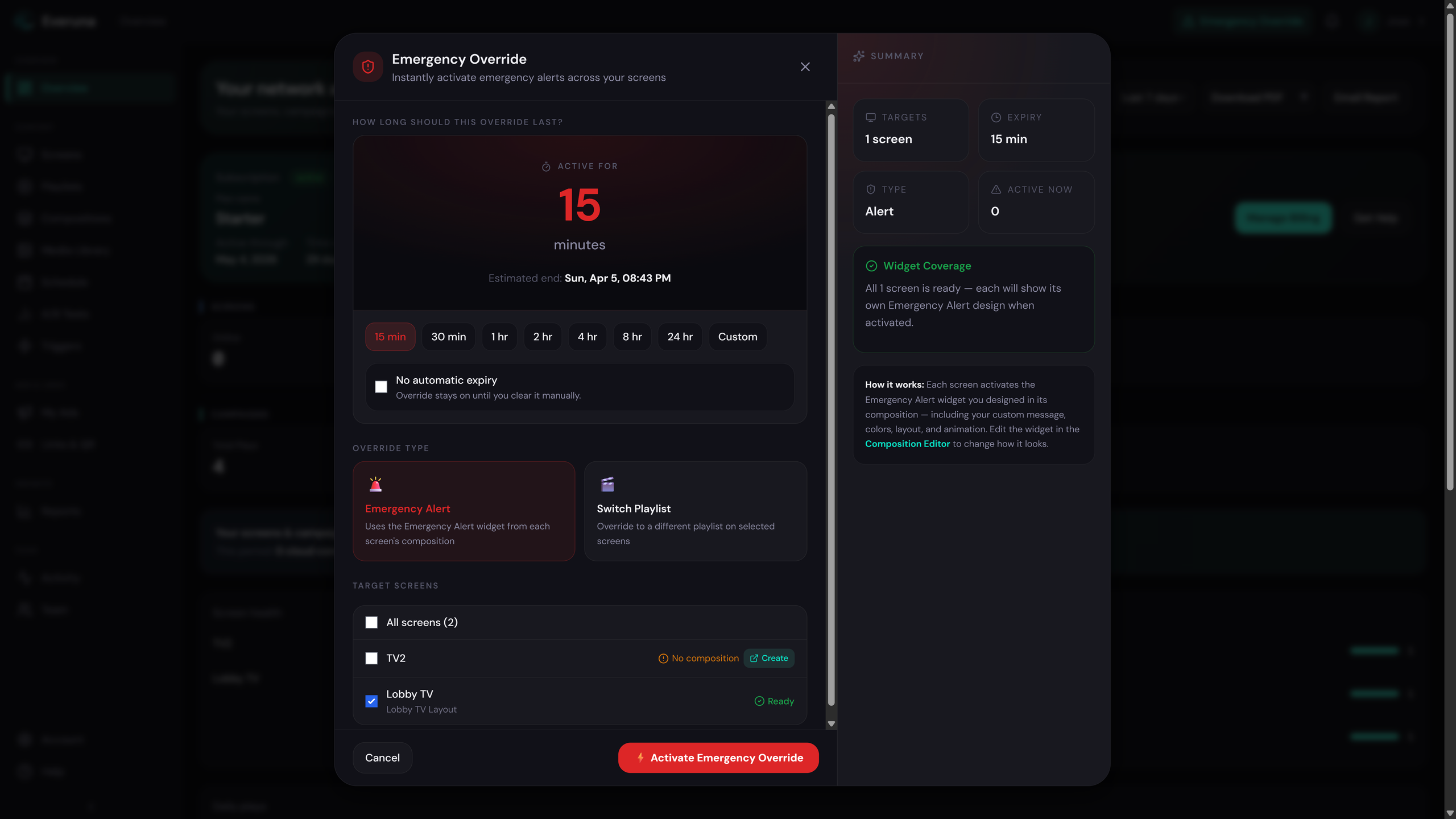
Emergency override
Push urgent content to every screen instantly. Useful for alerts, announcements, storewide updates, and time-sensitive messaging.
Proof-of-play reporting
Every play is logged with timestamp and duration — proof-of-play, meaning a record that the screen really showed the file. Export the log or a campaign summary anytime.
Team access and roles
Invite Admin, Editor, and Viewer users so your team can manage screens securely with role-based access.
Screen health alerts
Monitor all screens in real time and get notified if a display goes offline or needs attention.
Sports score triggers
Automatically adjust content based on live sports outcomes to create more dynamic in-venue experiences.
CSV export
Export proof-of-play data and analytics for custom reporting, internal analysis, and client reporting workflows.
Queue management
Waiting-room check-in, kiosk display, and SMS notifications for clinics, service shops, and any venue that manages customer flow on-screen.
Inside the product
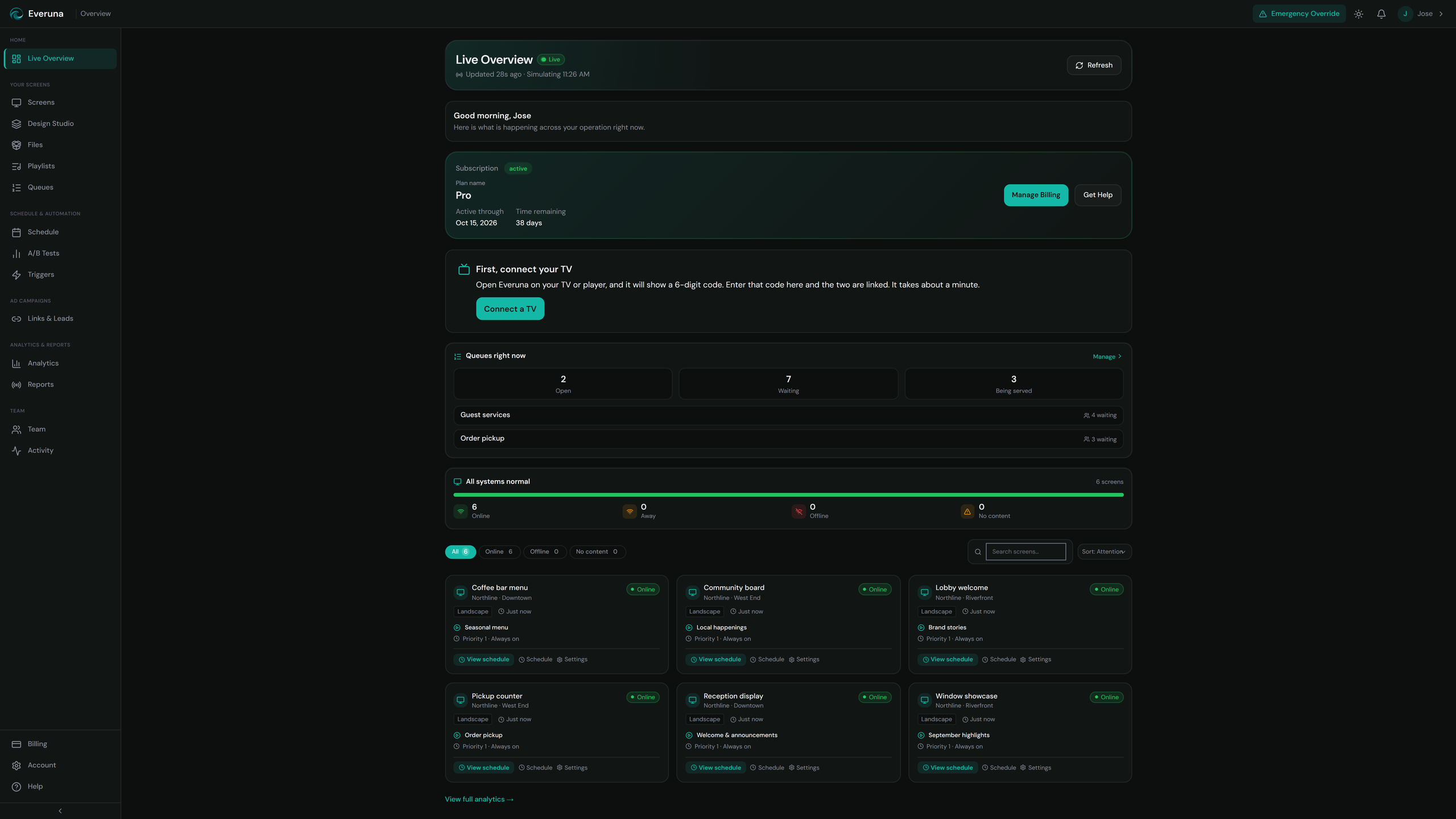
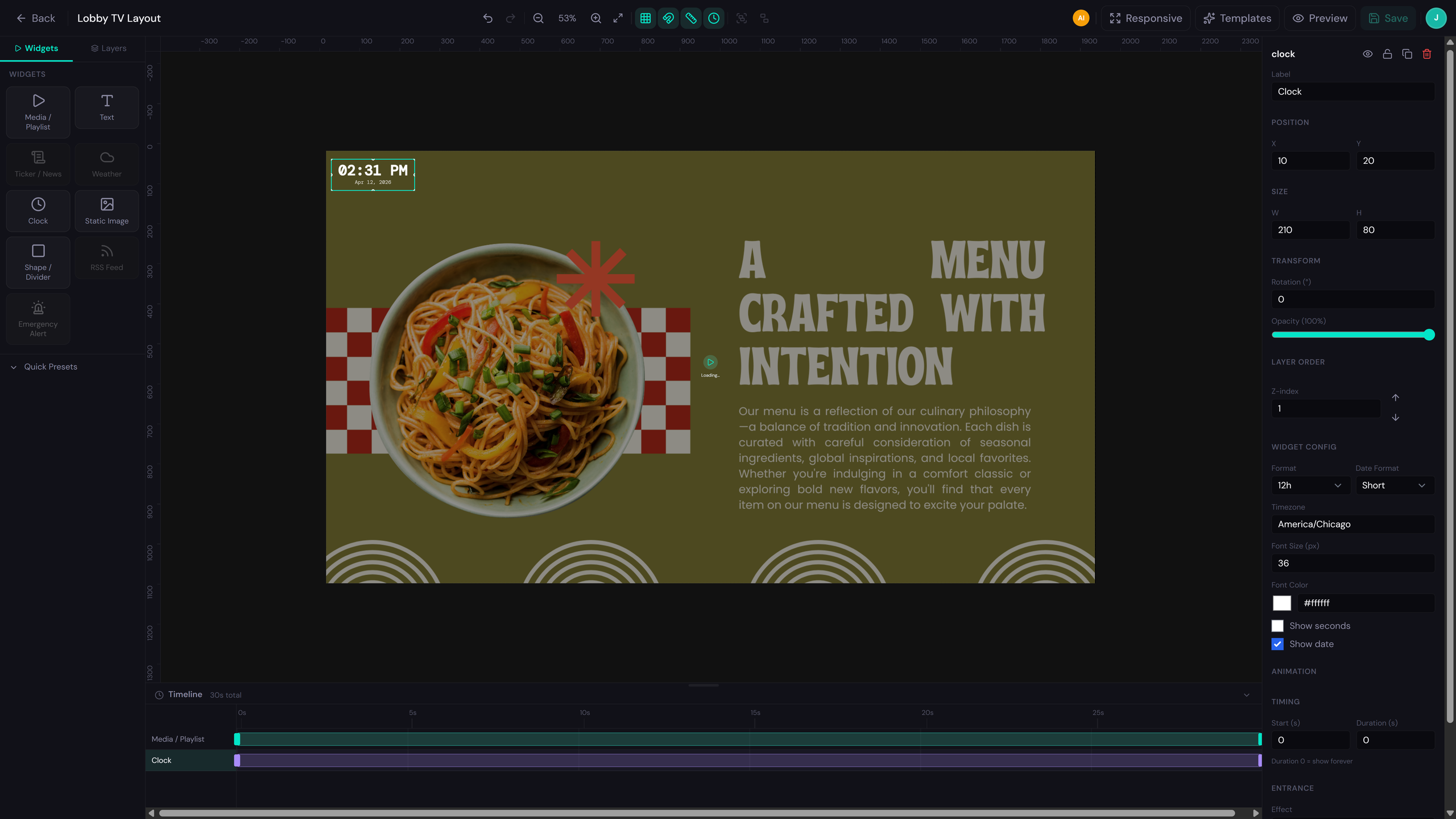
Real screens from the Everuna dashboard—pairing, playlists, layout widgets, and urgent messaging.
Connect your screen
Enter the pairing code on your display to link TVs, sticks, and tablets to your dashboard in seconds.
Build playlists visually
Drag and drop media, set durations, and organize playlists without complex workflows.
Design Studio
Design layouts with widgets—weather, announcements, emergency alerts, clocks, and more—so every screen shows the right mix of live data and branded content.
Emergency override
Broadcast urgent messages to every connected screen for alerts, closures, and time-sensitive updates.
Run your waiting room on autopilot
Give customers a professional check-in experience while your screen does the work.
Queue Management
Business+Create a queue in your dashboard, assign it to a screen, and customers join by scanning the QR code displayed on your TV or visiting your kiosk URL. Staff calls the next ticket from the dashboard — the screen updates instantly.
- Customers join from any phone — no app needed
- Ticket numbers displayed live on screen
- Staff controls the queue from any device
- Configurable ticket prefix and service time estimates
SMS Notifications
Business+When a customer joins the queue they receive a confirmation SMS with their ticket number. When staff calls them, a second SMS fires automatically. Customers can reply STATUS to check their position or CANCEL to leave — no staff intervention needed.
- Join confirmation sent automatically on check-in
- "You're up next" alert sent when called
- Guests reply STATUS or CANCEL via SMS
- Custom message templates per queue
Queue Display Widget
Business+Add a Queue Display zone to any screen composition. It shows who is currently being served and who is next, with your brand colors. A built-in promotional panel lets you display offers or announcements alongside the queue so the screen earns attention even while people wait.
- Live queue list updates without page refresh
- Branded with your colors and business name
- Promotional message panel for upsells
- QR code shown on screen so walk-ins can join
Show the right content at the right moment
Automate what plays based on weather, time, and live events — without touching the dashboard.
Weather Widget
Business+Connect a screen to live weather data and display current conditions as a corner overlay, banner, card, or full-screen weather break. Styles and placement are configured per screen. Data refreshes automatically throughout the day.
- Current temp, conditions, and forecast
- Corner overlay, banner, card, or full-screen modes
- Configured per screen with custom placement
- Powered by live WeatherAPI data
Smart Triggers
Business+Set rules that automatically switch content based on real-world conditions. When it's cold outside, show a hot drinks promo. During business hours, show one playlist; after hours, switch to another. When a local sports team wins, push a celebration graphic.
- Weather-based triggers (temperature, conditions)
- Time-of-day and day-of-week rules
- Sports score triggers for live game outcomes
- Rules stack — multiple triggers per screen
Composition Editor
Business+Design multi-zone screen layouts where each region shows something different simultaneously — a branded header, a live weather panel, a queue display, and a media zone all on one screen. What you design in the editor is exactly what appears on the screen.
- Drag-and-drop zone layout builder
- Widgets: weather, queue, clock, RSS, emergency alert, media
- 1:1 preview matches what the screen shows
- Assign different compositions to different screens
RSS Feed Ticker
Business+Add a scrolling RSS feed zone to any composition — news headlines, sports updates, or any public RSS source. Configures with scroll speed, item count, and refresh interval. Runs as a live widget inside your layout without interrupting other content zones.
- Any public RSS feed URL supported
- Configurable scroll speed and max items
- Auto-refreshes on your set interval
- Runs alongside other widgets in the same layout
Stay in control, always
Monitor screen health, manage your team, and react instantly when something needs attention.
Emergency Override
Business+One click broadcasts an urgent message to every connected screen — or just the screens you select. Choose fullscreen takeover, top/bottom banner, or center card overlay. Pick an icon, animation, and colors. The override clears from a single button when the situation is resolved.
- Fullscreen, banner, or card overlay modes
- Alert, info, warning, and fire icon options
- Pulse, fade, slide, and bounce animations
- One-click clear when the situation passes
Screen Health Monitoring
Every paired screen reports its status continuously. If a screen goes offline — power cut, network drop, device restart — you get an email alert. The dashboard shows last-seen timestamps for every screen so you always know what's live and what isn't.
- Online/offline status for every screen
- Email alerts when a screen goes dark
- Last-seen timestamp per device
- Health view in admin and customer dashboards
Team Roles
Business+Invite team members and assign them a role. Admins can manage billing, screens, and settings. Editors can upload content and manage playlists but can't touch billing. Viewers can read dashboards and reports without changing anything.
- Admin, Editor, and Viewer roles
- Invite via email — no account needed to start
- Role-scoped access enforced in dashboard and API
- Activity log tracks who changed what
Proof-of-Play Logs
Every time content plays, a timestamped event is logged with the screen name, location, and duration. You can filter by screen, date range, or content item and export the full log as CSV. Useful for internal reporting or proving to a client that their content ran.
- Every play logged with timestamp and duration
- Filter by screen, date range, or content
- Export as CSV for external reporting
- Accessible from dashboard and weekly PDF report
QR Codes & Lead Capture
Business+Attach a trackable QR code to any content item. When scanned, it can go directly to a URL or open a custom landing page that collects the visitor's name, email, or phone number — and optionally delivers a coupon or offer code on submit. Leads appear in your dashboard immediately.
- Unique QR code per content item
- Optional lead capture landing page
- Deliver coupon or offer codes on form submit
- Hold the reward behind a “follow us” tap to grow your social following
- Lead count and scan data in Links & Leads dashboard
Turn Scans Into Followers
Business+Switch on social unlock and the reward stays hidden until the visitor taps to follow you on Instagram, Facebook, TikTok, YouTube, or X. Their contact details are saved the moment they submit the form, so you keep the lead whether or not they follow through — and you see how many people tapped.
- Works with Instagram, Facebook, TikTok, YouTube, and X
- Contact details are captured before the follow step, so no lead is lost
- Set how long to wait before the reward unlocks
- Follow taps tracked alongside scans and clicks
Cloud signage vs network advertising vs hybrid
Choose the model that fits your business, your screens, and your growth strategy.
| Feature | Cloud | Network | Hybrid |
|---|---|---|---|
| Your own content on your own screens | — | ||
| Earn from network advertising | — | ||
| Custom playlist scheduling | — | ||
| Content triggers and automation | — | ||
| Emergency override messaging | — | ||
| Team access and permissions | — | ||
| Proof-of-play reports | |||
| QR tracking and analytics | |||
| Lead capture from QR scan visitors | |||
| Social unlock — trade a follow for the reward | |||
| Queue management (waiting-room, kiosk display & SMS notifications) | — |
Works with the hardware you already have
No expensive proprietary hardware required. Use smart TVs, Fire TV Stick, Android TV, tablets, computers, or commercial displays that can run a browser-based signage player.
Start your 14-day free trial — no credit card needed
Launch your first screen, build playlists, schedule content, and manage digital signage from the cloud with a setup designed for real businesses.
Built for businesses that need cloud digital signage, content scheduling, and screen management in one place.